
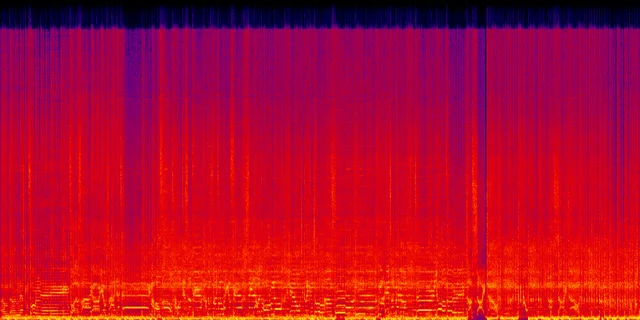
Metallic shimmer
A glassy or shiny layer around vocals, cymbals, bright synths, and reverb tails.


Waveforms from the Verdict Upside Down demo, shown at the same scale. Listen below to judge the sound.
Play the same passage before and after cleanup. Switch versions while it plays and listen for the difference.
Verdict Upside Down
0:00 / 0:00
Lost in the Orbit
0:00 / 0:00
Press play, then switch versions. Keep listening from the same moment.
The difference may be less noticeable on a phone or weak speakers. Keep the level comfortable and decide whether the vocal sounds cleaner, not simply louder.
Upload, check, then compare. Keep the original close and let your ears decide.
Choose the export you want to check in the Sunofix app.
Review the analysis and choose the cleanup that fits what you hear.
Use your credit, listen to the result, and compare it with the original.
A glassy vocal. A brittle cymbal. A haze over the mix. Focus on the texture that gets in the way of your song.
A glassy or shiny layer around vocals, cymbals, bright synths, and reverb tails.
Plastic tone, hard consonants, or a synthetic edge that makes a strong vocal feel detached.
Piercing hats, brittle upper mids, splashy cymbals, and fast listening fatigue.
Cleanup works on the sound of your existing track. It does not rewrite lyrics or rearrange the song, and it cannot guarantee a perfect repair. Compare both versions before deciding.
Cleanup reduces unwanted texture in the source. Mastering adjusts loudness and balance for the final release; it can also make remaining artifacts more obvious.
No subscription. Buy more credits only when you need them.
Free
Your first cleanup
1 credit included. No card required.
$1
per credit
Clean one additional track
Sold in packs. No subscription.
One-time purchase. No subscription or auto-renewal. By continuing, you agree to the Terms and Refund Policy.
Mike Schwarz
Founder of Sunofix and AI music cleanup researcher
Mike Schwarz is the founder of Sunofix and the author of its audio cleanup guides. The demos let you hear the result; the guides explain the decisions and the limits.
Contact Mike and supportNew accounts receive one free credit. You do not need a card to try your first cleanup.
The app accepts MP3 and WAV files. Start with the export you want to check.
Sunofix processes the sound of your existing track. It does not rewrite lyrics or rearrange the song. Processing can affect musical detail, so compare the result with the original.
Yes. Compare the original and processed audio in the app, then download the version you want to keep.
No. Additional credits are sold in packs as a one-time purchase, with no automatic renewal.
Audio is uploaded to the server for processing. Audio files are retained for up to seven days. Read the Privacy Policy for details about data handling.
Results depend on the track and the problem. Cleanup cannot guarantee a perfect repair or distributor approval. Listen for improvement while checking that musical details remain.
Start with one free credit for your new account. Compare the result and keep the version you prefer.
Upload your trackPractical guides to hearing the problem and choosing the smallest useful change.


Generate a detailed 1920 × 840 spectrogram from an MP3 or WAV. The file stays inside your browser and disappears when the tab closes.
Suno / Udio / BandLab / Riffusion / Mureka / Treblo