
Seed-Music Audio Quality: Clean Vocal Bleed and Unnatural Reverb
A listening-first guide to checking ByteDance Seed-Music audio for vocal bleed, masked transients, reverb mud, harshness, and low-end instability before mastering.
Clean my Seed-Music render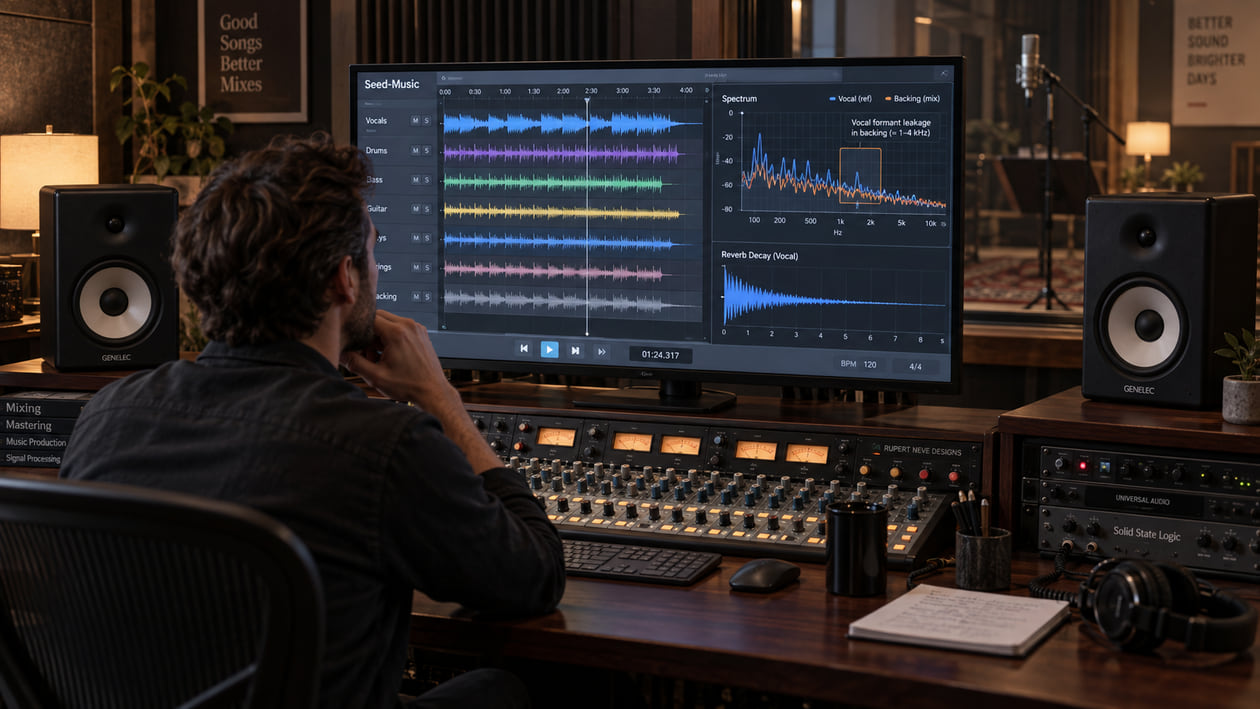
A generated vocal can sound convincing on its own, yet leave a faint vowel-shaped shadow in the instrumental. A snare may still be loud but lose its first sharp edge when the chorus fills up. Long reverb can turn into a metallic cloud that follows every phrase and makes the mix feel smaller instead of deeper.
Do not begin by assuming that Seed-Music created each defect. Preserve the original file, loop the same moments, and compare the full mix with every stem you actually received. A repeatable vocal trace in an instrumental file calls for a different decision than ordinary arrangement overlap, source-separation residue, or reverb that was intentionally printed into the mix.
Checked September 21, 2026. ByteDance presents Seed-Music as a unified suite for controlled music generation and post-production editing. The technical report describes 44.1 kHz stereo audio, multimodal controls, and experimental stem-capable configurations. The public material reviewed for this guide is a research and listening-demo release; it does not document public model weights, an API, consumer download formats, or commercial output terms.
The short answer: inspect the Seed-Music render before mastering
Start with three short loops: an exposed vocal phrase, the busiest chorus, and the longest reverb tail. Listen first to the untouched full mix at a comfortable level. Then inspect any available vocal and instrumental files without changing their gain, timing, or stereo width.
If vocal consonants or vowel formants remain audible in an instrumental stem, mark the exact timestamp and compare that stem with the full mix. If the trace appears only after third-party source separation, treat it as separation residue until you have stronger evidence. If it is already present in an original multi-channel output, keep the file and workflow details with your notes.
I usually lower the monitor level for this check. A real vocal trace still forms recognizable syllable movement when the volume drops; broad synth brightness or reverb often becomes a less specific wash. That small listening move prevents a spectral peak from becoming a diagnosis by itself.
Do cleanup before the final limiter. Limiting can lift quiet residue, harden a reverb tail, and make transient masking more obvious. If you still need help naming the sound, use the AI music artifacts listening guide before building a processing chain.
Diagnose the Seed-Music audio you actually have
Use timestamps and plain listening language. A spectrogram can support the decision, but it cannot tell you which model stage caused the sound.
- Vocal-like residue in an instrumental: You can follow fragments of consonants, vowels, breath, or pitch movement after the vocal is muted. Confirm that you are hearing the instrumental file alone, not a send, bus, or monitoring route.
- Reverb mud: Several notes leave overlapping tails that blur words and drum attacks. Bypass any added reverb before deciding the source file is responsible.
- Metallic reverb decay: A long tail develops a thin ringing or flutter instead of fading smoothly. Check whether the ring follows one pitch, the vocal, or the whole mix.
- Transient masking: The snare, kick, or pluck remains present but its first short attack is hidden by vocal energy, ambience, or dense instrumentation. This can be a mix balance issue rather than damage.
- High-frequency grit: Sibilants, hats, and bright synths feel sandy or tiring. Compare the exposed sound with the chorus before cutting the whole top end, then use the harsh-highs guide if the problem repeats.
- Midrange resonance: One vowel or instrument note pushes forward with a narrow ringing quality. Find out whether it repeats at the same pitch.
- Low-end instability: Bass weight shifts when you fold the mix to mono, or long low notes wobble in level. Check stereo width, phase, and any later processing.
Do not remove everything visible between vocal harmonics. Instruments naturally share the same frequency region as the human voice. The useful question is whether you can hear unwanted vocal information in the wrong file and whether it distracts from the song.
Stop if the suspected problem disappears in normal playback, does not repeat, or is part of an intentional harmony, pad, vocoder, or ambience. Cleanup should solve an audible problem, not make a graph look empty.
Source preflight: framework, file, stems, and rights
The official technical report describes a family of pipelines rather than one downloadable consumer product. Its controlled generation inputs include lyrics, style descriptions, audio references, musical scores, and voice prompts. The project page also demonstrates expressive multilingual vocals, note-level editing, and zero-shot singing voice conversion from a short authorized voice sample.
In the audio-token pipeline, the report describes a renderer that produces 44.1 kHz stereo audio. It also discusses time-aligned instrumental conditioning and multi-channel outputs that can generate musically distinct vocals, bass, drums, and guitar when suitable training examples are available. That is a research capability, not proof that every Seed-Music interface supplies native stems.
Record the page or service you used, date, prompt, reference inputs, settings, generation identifier, and every file exactly as received. Inspect sample rate, channels, bit depth, clipping, and whether files are native outputs or products of source separation. Do not label an MP3 converted to WAV as a lossless original.
The paper notes that source-separation systems can introduce artifacts. This matters because apparent vocal bleed may have been created while extracting a stem from a full mix, not during the original generation. Compare the mixture and separated files before processing either one.
Rights require the same care. The arXiv page labels the technical report CC BY-NC-SA 4.0, but that publication license is not a model license, service agreement, or grant of commercial rights in output. The reviewed official pages do not publish commercial output terms. Confirm the current rules of the exact interface and make sure you have permission for lyrics, scores, recordings, audio references, and voices.
Seed-Music vocal bleed in instrumental stems
Seed-Music Vocal Bleed in Instrumental Stems
| What you hear | What to compare | Smallest useful action | Stop when |
|---|---|---|---|
| Clear syllables remain after muting the vocal | Instrumental alone, vocal alone, full mix, and routing | Check buses and file alignment before processing | The residue is traced to routing or a specific file |
| Vowel-shaped tone follows the lead melody | Spectrogram plus quiet playback of the instrumental | Use a narrow dynamic cut only if one repeatable band is distracting | The trace recedes without hollowing instruments |
| Sibilants splash across hats | Vocal consonants, cymbal hits, and any separator output | Try a conservative dynamic high-band process on the affected stem | Hats keep their attack and air |
| Reverb carries ghosted words | Dry phrase, tail, and any effects return | Shorten or lower the printed tail only if you control that layer | Words become clear and the space still feels natural |
| Residue exists only in separated stems | Original full mix and separation result | Return to the mix, try a better lawful separation, or accept limited isolation | The fix no longer damages useful signal |
| Full mix sounds clean despite imperfect stems | Full mix at matched loudness and in mono | Leave it alone or use stems only where they help | The song works and no residue distracts |
This matrix is a diagnostic aid, not a published Seed-Music defect benchmark. The official sources do not state that unified conditioning routinely causes vocal timbre to leak into accompaniment. Your file is the evidence.
Compare the full mix and every available stem at matched loudness. If one version is louder, it will often seem clearer and more detailed even when the residue is unchanged. Align files to the same start point and avoid judging a stem through master-bus processing that was designed for the complete mix.
Restrained manual cleanup in your DAW
Duplicate the source and keep the original muted but immediately available. Work on one marked loop at a time. Change one control, level-match, and bypass it before moving on.
First fix routing mistakes. Solo the instrumental, disable vocal sends, reverb returns, sidechain audition modes, and hidden parallel buses. A vocal appearing through a shared effects return is not stem bleed in the source file.
For one repeatable resonance, use a dynamic EQ. It lowers a narrow region only when that region becomes too strong, instead of permanently darkening the stem. Use dynamic EQ only when a repeatable resonance appears, and stop if guitars, keys, or the body of the snare become thin.
If sibilants remain in an instrumental, a light de-esser may help, but compare it against cymbal attacks. The same high-frequency range can carry both the unwanted consonant and useful percussion. If the hats lose their shape before the residue stops distracting you, regeneration or a different separation pass is safer.
For reverb mud, first shorten or lower a return you actually control. If the ambience is printed into a stereo mix, broad gating can pump between words and pull down quiet instruments. A gentle dynamic process may reduce the haze, but it cannot recreate a dry vocal or unmix the room.
High-pass filtering below 30 Hz is not mandatory. Confirm that sub-rumble is present and has no musical role. Raise the cutoff slowly, then stop at the first loss of kick weight, bass sustain, or warmth.
I finish by listening to the chorus with the screen off. If the cleanup only looks more organized but the vocal feels smaller, the groove softens, or the room collapses, I undo it. Preserving the performance matters more than winning a spectral comparison.
The Sunofix cleanup path for Seed-Music audio
Manual work is best for one routing error, one resonance, one edit boundary, or one effects return. Broader cleanup becomes reasonable when artificial grain, metallic texture, or reverb haze moves through several sources and static cuts start removing the music with it.
I built Sunofix for this stage: the song already works, but the rendered audio needs cautious cleanup before mastering. Upload a lawful WAV or MP3, begin with a conservative pass, and keep the original for comparison.
Sunofix can reduce synthetic edge, broad harshness, hiss-like grain, and metallic haze in a full mix while preserving melody, lyrics, arrangement, dynamics, and emotion. It cannot isolate true stems, remove a specific singer from an accompaniment, restore a missing attack, repair a wrong note, or recover information already lost to clipping or lossy encoding.
Use level-matched before-and-after playback on the marked phrase, chorus, and tail. If the residue becomes less distracting while transients and ambience remain intact, the pass has helped. If the mix becomes dull or the vocal loses presence, return to the original and choose a narrower repair.
Cleanup and mastering are separate decisions. Artifact removal should happen before mastering because the final loudness stage can magnify small defects. Once the source is stable, mastering can address overall tone, dynamics, sequence, and delivery.
Technical and legal boundaries
A vocal-like pattern in an instrumental does not prove that Seed-Music caused it. It may come from intentional arrangement overlap, shared reverb, source separation, editing, encoding, resampling, a monitoring route, or later processing. State what you hear and how you reproduced it.
The report’s mention of stem generation and multi-channel outputs does not guarantee public stem export, perfect isolation, or identical behavior across systems. Sunofix works on the file you upload. It can reduce shared spectral symptoms, but it cannot independently rebalance instruments inside a finished full mix.
Sunofix cannot repair lyrics, melody, arrangement, or performance. It does not remove watermarks, evade automated AI-detection systems, convert unclear rights into commercial rights, or certify ownership. Cleanup does not grant legal clearance or guarantee distributor approval.
Keep the original file, prompts, reference inputs, voice permissions, license snapshot, edit session, cleaned render, and master as separate records. If the exact Seed-Music service or terms cannot be identified, resolve that before release rather than treating cleanup as a rights shortcut.
Seed-Music audio release checklist
- Preserve the original file before conversion, separation, cleanup, or mastering.
- Record the exact Seed-Music page or service, date, prompt, controls, generation identifier, and reference inputs.
- Confirm current rights and terms for the service, model, lyrics, score, voice, samples, and audio references.
- Inspect the real files for format, sample rate, channels, bit depth, clipping, and prior lossy encoding.
- Mark an exposed vocal phrase, busiest chorus, longest tail, strongest transient, and lowest note.
- Check routing and effects returns before diagnosing stem bleed.
- Compare the full mix and every available stem at matched loudness.
- Confirm whether a stem is native or source-separated and keep the mixture for comparison.
- Use dynamic EQ only when a repeatable resonance appears.
- Protect cymbal air and consonant clarity when testing de-essing or high-band cleanup.
- Repair one local boundary locally instead of processing the whole song.
- Test broader cleanup only when unwanted texture follows several sounds or sections.
- Use level-matched before-and-after playback on headphones, speakers, and mono.
- Stop when the performance, transients, space, or low-end weight begins to shrink.
- Master only after cleanup is stable, then archive every stage separately.
The render is ready for the next step when the vocal remains clear, the instrumental no longer carries distracting word-shaped residue, attacks still speak, and reverb decays without metallic flutter or mud. If the source still needs a new performance, true stem balance, or rights clarification, cleanup is not the final answer.
Continue listening
Related reading
FAQ
Seed-Music Audio Quality: Clean Vocal Bleed and Unnatural Reverb FAQ
What causes digital artifacts in Seed-Music audio?
A rough tail, vocal-like residue, or masked attack can enter during generation, rendering, source separation, editing, encoding, or later processing. The official Seed-Music sources do not publish a universal artifact profile, so compare the untouched file and mark the exact audible event before choosing a repair.
Does Seed-Music officially export separate stems?
The technical report describes experimental systems that can generate individual stems and multi-channel outputs when trained for them. The reviewed official project page does not document a public consumer stem-export workflow or guaranteed download formats. Inspect the files and terms of the interface you actually used.
Can Sunofix clean a Seed-Music render?
Sunofix can reduce unwanted artificial texture, broad harshness, hiss-like grain, and reverb haze in a lawful WAV or MP3 full mix. It cannot perform true stem-level rebalancing, restore a missing transient, rewrite lyrics or melody, or guarantee that every form of bleed will disappear.
Can I use Seed-Music output commercially?
The reviewed official Seed-Music research and demo pages do not publish commercial output terms. The CC BY-NC-SA notice on arXiv covers the technical report, not a model or output license. Confirm the current terms of the exact service, model, and inputs before release.