
DiffRhythm Stereo Drift: Diagnose the Export
Check a DiffRhythm render for stereo drift without narrowing the entire song. Compare stereo, mono and matched-level playback.
Clean my DiffRhythm render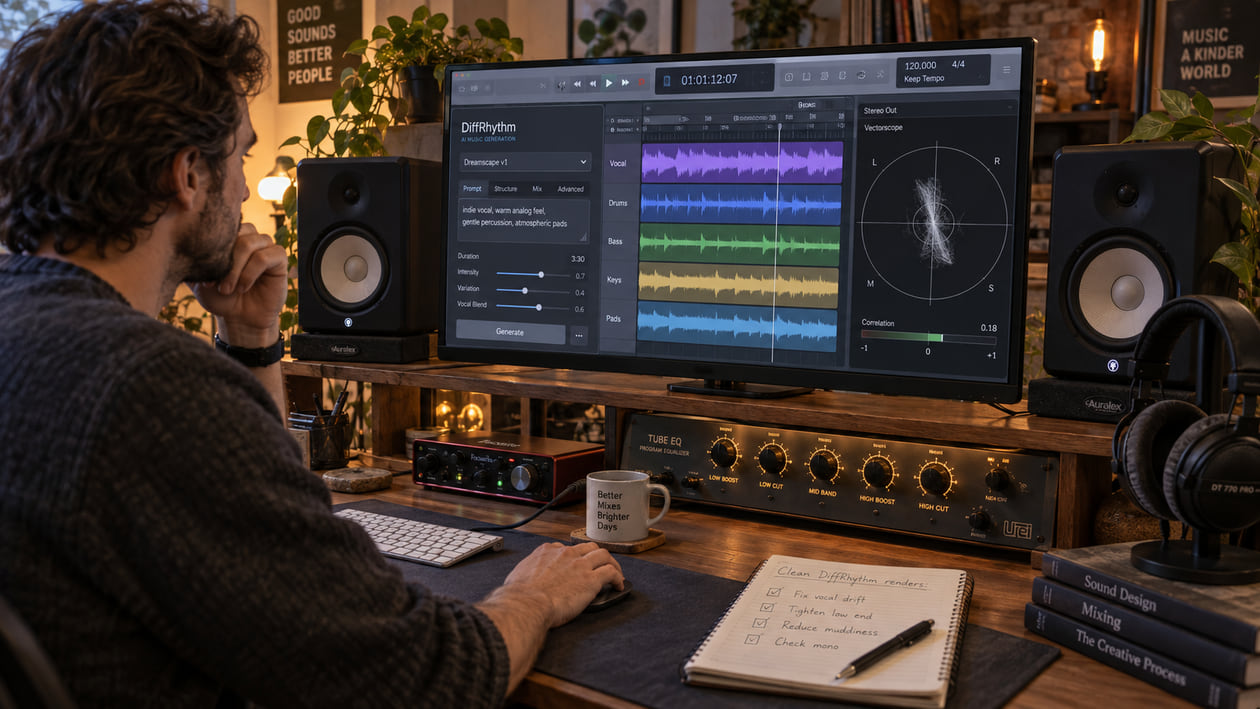
A DiffRhythm song can feel centered in the verse, then make the singer slide toward one speaker when a soft consonant enters. You may also hear an s, t, or k lose its shape, a thin hiss follow the vocal, or a click appear at an edited section. Those are useful listening notes. They are not proof that the diffusion model caused every problem.
Keep the untouched WAV and compare each change at the same loudness. Center only the phrase that actually moves, repair one click locally, and return an incorrect lyric or missing consonant to generation. Use broader cleanup when a synthetic haze follows several sounds through more than one section.
Checked September 21, 2026. The official DiffRhythm repository and paper describe a non-autoregressive latent-diffusion system that generates vocals and accompaniment together. The current v1.2 inference path saves a 44.1 kHz WAV, uses 32 sampling steps with a CFG strength of 4.0, and accepts durations from 95 to 285 seconds. It supports text or reference-audio style conditioning. The default repository workflow does not document FLAC, MP3, or separated-stem output.
The short answer: verify the render before you center it
Start with three short loops: one exposed vocal line, the busiest chorus, and the end of a reverb tail. Listen in stereo, then switch to mono. Check the same passage on headphones and another stereo speaker system at a comparable level. If the voice moves sideways only on a few syllables, mark those moments. If the whole mix narrows or becomes hollow in mono, the problem is wider than one consonant.
Do not assume that an unsteady stereo image came from “incomplete diffusion convergence.” The official sources explain the model architecture, but they do not publish a universal defect profile for stereo drift, hiss, or whispered consonants. A vectorscope can show movement between the left and right channels; it cannot tell you which stage created it.
I usually check the exposed vocal before touching the chorus. A dense chorus can hide a wandering center, while a quiet line makes the movement obvious. Then I return to the chorus to make sure the repair did not shrink the music.
If you cannot yet name what you hear, use AI music artifacts explained to separate hiss, shimmer, clipping, phase problems, and edit clicks before reaching for a processor.
Diagnose the DiffRhythm file you actually generated
Work from a timestamp, not a preset name. Save the original render and note the checkpoint, repository revision, export settings, and any edits before changing width. These details make the comparison repeatable; they do not show that the model architecture caused the audible movement. The same unpleasant moment can have several causes, and each cause needs a different next step.
- Stereo drift: The lead vocal seems to lean left or right, or its center becomes vague on certain words. Compare stereo with mono and watch a correlation meter or vectorscope. Movement is evidence in the file, not evidence about the model’s internal cause.
- Soft or whispered consonants: An
s,t, orklacks its normal attack, so the word becomes harder to understand. Compare it with another occurrence of the same sound. EQ can reduce harshness, but it cannot recreate articulation that is absent. - Vocal hiss or moving grain: A thin layer follows the voice, breath, or reverb instead of staying steady in the background. Check the untouched WAV before using denoise; a fixed noise profile may miss texture that changes with the phrase.
- Midrange resonance: One note or vowel presses forward and becomes tiring. Sweep only to locate the moment, then use a small dynamic move that acts when the resonance appears.
- Low-end cancellation: Bass loses weight in mono or shifts toward one side. Confirm that the problem repeats before changing width or filtering the whole mix.
- Edit click: A short vertical spike appears at one boundary. Use a short fade or crossfade there. Full-song processing is the wrong tool for one discontinuity.
A graph can help you find a repeatable event. It cannot decide whether a breath, rough consonant, wide pad, or unstable ambience is a mistake. If the track sounds comfortable and the image only looks unusual, leave it alone.
Source preflight: model, settings, format, and rights
Write down the model checkpoint, repository revision, lyrics file, style prompt or reference audio, duration, edit segments, and interface. The official repository lists base and full v1.2 checkpoints. Its inference code supports a 95-second base length and values from 96 through 285 seconds for the longer path.
The current code samples with 32 steps and a CFG strength of 4.0, decodes the latent audio, peak-normalizes the result, converts it to 16-bit integer samples, and saves output.wav at 44.1 kHz. That is the official local path reviewed here. A community fork or hosted interface may change settings, normalize again, or offer other formats.
Preserve the original generated WAV before editing. If your interface gave you MP3 instead, keep that MP3 too. Converting it to WAV creates a safer working container for further edits, but it does not restore detail removed by lossy encoding.
Reference audio is conditioning input, not an output stem. The official scripts accept a reference file or a text prompt for style, then generate a complete song. They do not promise separate vocal, drum, bass, or instrumental files. Do not call an AI-separated vocal a native DiffRhythm stem.
The repository releases its code and DiT weights under Apache 2.0. Follow its notice and disclaimer conditions, and keep a snapshot of the terms you relied on. The license does not clear third-party lyrics, recordings, voices, samples, or protected material supplied as a reference.
DiffRhythm stereo field drift across vocal phrases
A goniometer, also called a vectorscope, plots the relationship between the left and right channels. A narrow upright shape often means a strong center. A wide horizontal shape can warn that the sound may change sharply in mono. Use it as a navigation aid, then confirm the result by listening.
DiffRhythm Stereo Field Drift Across Vocal Phrases
| What the phrase does | What to compare | Smallest useful action | Stop when |
|---|---|---|---|
| Vocal leans to one side on one syllable | The same syllable in stereo and mono | Automate a small balance or Mid/Side change only for that phrase | The center feels stable without flattening the room or backing parts |
| Consonant spreads wide while the vowel stays centered | Adjacent consonant-vowel pairs | Lower the Side component briefly or edit the syllable if a clean alternate exists | The word remains clear and the image stops jumping |
| Entire chorus becomes hollow in mono | Verse, chorus, and untouched render | Find the widest source or effect before changing the full mix | Mono retains vocal focus and low-end weight |
| Hiss follows both sides of the vocal | Exposed phrase, tail, and silent gap | Test gentle artifact cleanup rather than a fixed stereo correction | The haze recedes without making breath and cymbals dull |
| Vectorscope looks wide but playback is stable | Quiet level-matched stereo and mono playback | Make no change | You cannot identify a repeatable audible problem |
Mid/Side means the shared center signal is the Mid channel and the difference between left and right is the Side channel. It is useful for diagnosis, but broad Side reduction can collapse reverbs, doubled parts, and intentional width. Keep the move short and bypass it often.
Compare stereo, mono and playback systems
Play the same exposed phrase in stereo and mono at a matched level, then listen on headphones and another stereo speaker system. Note whether the singer shifts on the same consonant each time, whether the center weakens only in mono, and whether the chorus still has its intended width. A weak center in mono is an observation to investigate, not a measured phase fault or proof of a model defect.
If the center weakens only in mono while the other stereo system sounds stable, write that down before touching the balance control. Compare the untouched export with the edited version at the same loudness; a louder version can seem clearer even when the vocal image has not improved. How to A/B Test Audio Cleanup Without Being Fooled by Loudness explains the comparison in more detail.
Stop before narrowing the whole song
Adjust only a repeatable problem phrase, then bypass the change. Keep it if the consonant stays intelligible and centered while the verse, chorus, and reverb retain their width. Undo it if the vocal becomes dull, the backing parts collapse, or the fix sounds better only because it is louder. Do not fold the entire stereo file to mono for one wandering word.
Restrained manual cleanup in your DAW
Duplicate the working file and disable the final limiter while diagnosing. Add markers at every vocal jump, softened consonant, click, bass change, and suspicious tail. Make one reversible move, then compare the same loop at matched loudness.
For a phrase that wanders sideways, start with clip-level balance automation. If the lead vocal is consistently weak in the center, a small Mid/Side adjustment may help, but remember that you are changing every sound in that time range. Do not force the whole song into mono to solve two unstable words.
For a soft consonant, first look for a clean alternate take or regenerate the phrase. A transient shaper can make an existing attack easier to hear, but it cannot invent a missing t or restore the exact pronunciation. If the consonant is present but gritty, short clip gain or dynamic EQ is safer than a permanent bright boost.
For hiss or upper-mid glare, use the harsh-highs guide to find the audible event rather than cutting a fixed band because a chart looks busy. A dynamic EQ lowers a problem area only when it becomes harsh. Stop if the vocal loses air or the cymbals turn flat.
High-pass filtering below 30 Hz is not an automatic cleanup step. Confirm that sub-rumble is present, inaudible musically, and consuming headroom. Raise the filter slowly and stop as soon as kick weight, bass sustain, or warmth changes.
Repair one consonant or click locally before processing the full mix. I end the manual pass by bypassing every processor, then enabling them one at a time. Several small corrections can still add up to a narrower, duller song.
The Sunofix cleanup path for DiffRhythm audio
Manual work makes sense for one click, one syllable, one resonance, or one brief stereo move. Broader cleanup is more useful when a shifting synthetic layer follows the vocal, cymbals, pads, and reverb through several sections. Repeated static cuts can remove more music than artifact at that point.
I built Sunofix for this stage: the song, lyrics, and arrangement already work, but the finished file still has an artificial edge before mastering. Upload a lawful WAV or MP3, keep the pass conservative, and use level-matched before-and-after playback on the marked vocal line, chorus, and tail.
Sunofix can reduce unwanted artifact texture while preserving melody, lyrics, arrangement, dynamics, and emotion. It does not center a lead vocal as a mastering decision, restore missing phonemes, create true stems, rewrite a lyric, or repair a wrong note. It also cannot recover samples already lost to clipping or lossy encoding. It cannot repair lyrics, melody, arrangement, or performance.
Check the result on headphones, an ordinary speaker, and mono. If the vocal stays intelligible, the chorus keeps its width, and the moving haze is less distracting, the cleanup has helped. If breath disappears or the mix becomes smaller, return to the original and use a narrower repair.
For the original file’s overall quality, see Improve Suno audio quality. If several sections carry unwanted texture and the manual checks point to cleanup, Suno artifact cleanup is the next step to consider. Stereo placement and missing consonants still need their own decisions.
Cleanup should happen before final mastering. Mastering sets the final tone, dynamics, sequencing, and delivery level. It cannot recover detail removed by an earlier overcorrection.
Technical and legal boundaries
DiffRhythm is a latent-diffusion song model, but that description does not diagnose your file. Stereo drift can also come from reference material, decoding, normalization, a manual edit, widening, reverb, resampling, or playback. A symptom in one render does not prove that DiffRhythm caused it.
Do not promise that centering or cleanup will make a song pass a distributor’s review. Sunofix does not alter provenance, help evade detection systems, certify ownership, or grant permission to use a voice or reference recording. Cleanup improves the audio you are entitled to process; it does not grant legal clearance or guarantee distributor approval.
Keep the original WAV, lyrics, prompt, reference audio, model revision, settings, license snapshot, edit session, cleaned source, and final master as separate files. That record lets you repeat the comparison and explain what changed.
Some width and breathiness may be part of the performance. Stop when the distracting movement recedes and the musical identity remains. A perfectly vertical vectorscope is not the goal.
DiffRhythm audio release checklist
- Preserve the original generated WAV before edits, cleanup, or mastering.
- Record the checkpoint and repository revision, plus lyrics, prompt or reference audio, duration, and edit settings.
- Inspect the real file for sample rate, bit depth, channels, clipping, and prior lossy conversion.
- Mark an exposed vocal phrase, busiest chorus, lowest bass note, loudest transient, final tail, and every edit boundary.
- Compare stereo and mono before changing balance, width, or Mid/Side processing.
- Name the audible symptom before interpreting the vectorscope or spectrogram.
- Repair one consonant or click locally before applying full-song processing.
- Regenerate missing lyrics, phonemes, notes, timing, or performance instead of asking cleanup to invent them.
- Test broader cleanup only when unwanted texture moves through several sources or sections.
- Use level-matched before-and-after playback on headphones, a normal speaker, and mono.
- Stop when clarity, breath, width, bass weight, attack, or emotion begins to shrink.
- Master only after cleanup decisions are stable, then archive each stage separately.
The render is ready for the next stage when the singer stays anchored, consonants remain understandable, the low end survives mono, and the unwanted hiss no longer pulls attention. If the result looks tidier but sounds smaller, go back. The song matters more than the meter.
Continue listening
Related reading
FAQ
DiffRhythm Stereo Drift: Diagnose the Export FAQ
Does stereo drift prove a diffusion-model fault?
No. Record the render settings and playback conditions first, then compare the untouched file in stereo and mono. A moving vocal does not identify which stage caused it.
Does cleanup guarantee release readiness?
No. Musical decisions, delivery checks, and final mastering remain separate steps after cleanup.
What causes digital artifacts in DiffRhythm audio?
A wandering vocal image, soft consonant, hiss, click, or smeared tail may come from generation, decoding, peak normalization, an edit, later processing, or playback. The official architecture does not identify the cause in your individual file. Compare the untouched WAV at the same timestamp before choosing a repair.
Does original DiffRhythm export WAV, MP3, FLAC, or stems?
The current official inference code saves a 44.1 kHz WAV. It accepts text or reference-audio style conditioning, but the repository does not document FLAC, MP3, or separated-stem output in that default workflow. A third-party interface may behave differently, so inspect the file you actually received.
Can Sunofix fix DiffRhythm stereo drift and whispered consonants?
Sunofix can reduce unwanted artificial texture in a lawful WAV or MP3 full mix. It does not make stereo imaging decisions, rewrite pronunciation, restore missing consonants, create true stems, or recover samples already lost to clipping or lossy encoding.
Can I use DiffRhythm output commercially?
The official code and DiT weights are released under Apache 2.0 with notice and disclaimer requirements. That software license does not automatically clear lyrics, reference audio, voices, samples, styles, or every generated output. Review the current license and the rights in every input before release.