
Meta MAGNeT Audio Quality: Fix Buzz, Jitter, and Stereo Drift
A practical guide to diagnosing Meta MAGNeT audio for high-frequency buzz, parallel-decoding-like jitter, stereo drift, and low-end instability before mastering.
Clean my MAGNeT render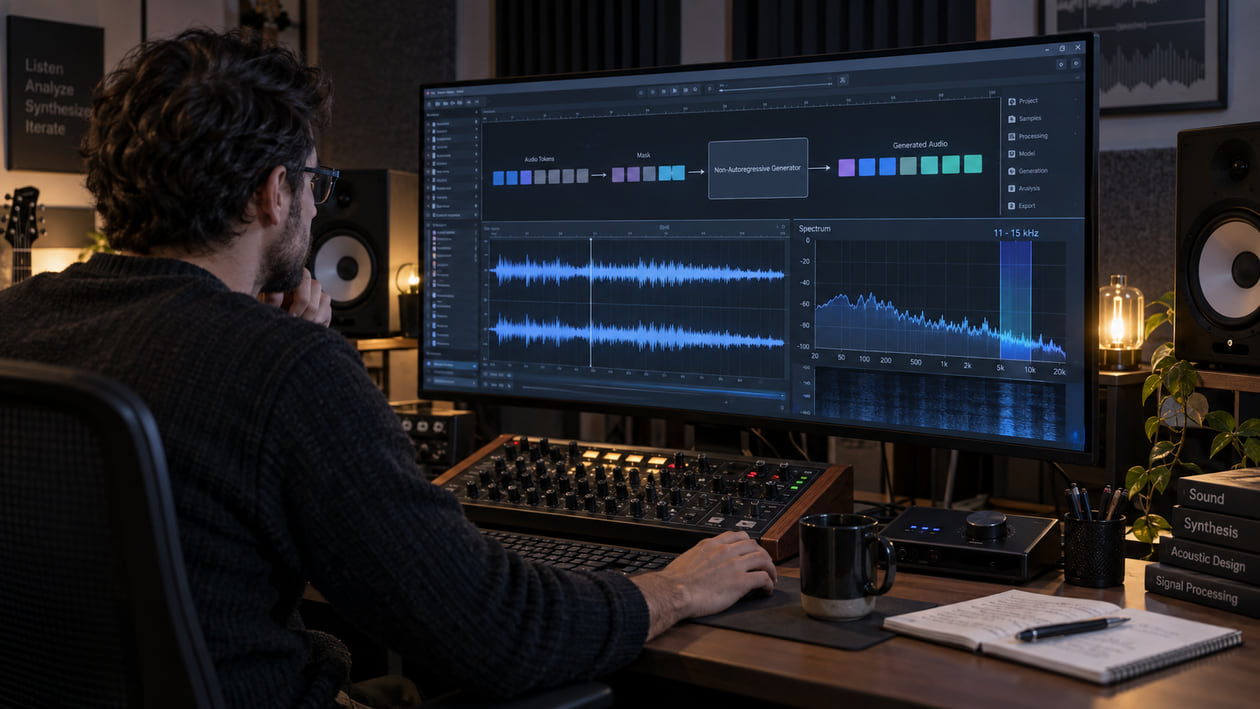
A MAGNeT render can have the right groove and still feel tiring after a few repeats. You may hear a thin electronic tone above the cymbals, a bright tail that seems to flutter instead of decay, or a wide pad that loses its center in mono. Those symptoms are worth fixing, but they are not fingerprints that identify the model or prove what happened inside it.
Keep the original file, mark the exact second that bothers you, and compare one small change at a time. Do not start with a limiter. A louder version can make a narrow buzz, rough decay, or unstable stereo image more obvious while also making the track seem more exciting.
Checked September 21, 2026. Meta documents MAGNeT as a single masked, non-autoregressive Transformer that generates audio tokens in parallel over several decoding steps. The released music models use a 32kHz EnCodec tokenizer with 4 codebooks sampled at 50 Hz. Meta does not document a universal 11–15 kHz buzz, a standard stereo-drift defect, or a fixed cleanup curve for MAGNeT.
The short answer: inspect MAGNeT audio before mastering
Start by listening to the untouched render at a comfortable level. Loop the quietest tail, the busiest section, and one transition. Then compare stereo with mono. If a narrow high tone stays present when the musical content changes, a small dynamic cut may help. If the tone follows a cymbal or synth naturally, removing it may remove the sound you wanted.
MAGNeT’s non-autoregressive design is about generation speed and the way masked tokens are refined. The paper reports the system as x7 faster than its autoregressive baseline in its evaluated setup. That does not mean every audible roughness is “parallel decoding jitter.” Resampling, loudness normalization, a third-party interface, an edit, lossy delivery, or later processing can create similar symptoms.
Cleanup comes before mastering. A mastering limiter cannot distinguish musical brightness from an unwanted narrow tone; it raises both. The cleanup-versus-mastering guide explains why you should repair a source problem before final loudness and delivery decisions.
I start with a quiet tail because dense drums and synths can hide a low-level buzz. If the same thin layer remains after the main sound decays, I know exactly where to loop and test. I still avoid naming the cause until I have compared the source, another seed, and any later conversions.
Diagnose the MAGNeT render you actually have
Write down what you hear in plain language before opening an EQ. “A whistle stays above the reverb from 00:12 to 00:15” is more useful than “the model sounds bad.” Work through these patterns separately:
- High-frequency buzz or grit: A narrow tone, fizz, or sandy layer sits above hats, air, or reverb. Check whether it remains at the same pitch and level or moves with the musical source.
- Jitter-like decay: A sustained sound seems to pulse, chatter, or change texture in tiny steps. This is an audible description, not proof of a particular decoding failure.
- Midrange resonance: A vocal-like lead, synth, or guitar layer becomes sharp on only a few notes. Loop the note and check whether a narrow band repeats.
- Stereo drift: A centered element leans, spreads, or becomes hollow when the file is summed to mono. Compare correlation and channel balance before changing the top end.
- Low-end instability: Sub energy wanders between channels, triggers a limiter, or disappears on small speakers. Check mono and bypass any widener.
- Edit discontinuity: A click or abrupt texture change appears where clips were joined. Zoom into that boundary before processing the entire file.
AI music artifacts explained can help you separate hiss, metallic ringing, clipping, and codec damage. A spectrogram can show where energy persists, but it cannot tell you that MAGNeT caused it. The same visible line may be a wanted oscillator, an electrical tone captured later, or an encoding artifact.
Compare at least two renders when you can. Keep the prompt and settings as close as possible, then change only the seed. If the suspected buzz disappears or moves, you have evidence that the symptom is not a fixed export filter. If it remains after every conversion of one source file, inspect the source and export path before blaming the generation architecture.
Source preflight: model, output, stems, and rights
Record which checkpoint produced the file. AudioCraft lists four text-to-music releases: small and medium models for 10-second and 30-second generation. It also lists separate Audio-MAGNeT checkpoints for text-to-sound. The public model card describes 300M and 1.5B released sizes; the training documentation also mentions a larger scale, but that does not make every training configuration a released checkpoint.
The official architecture uses a masked generative model rather than predicting the full sequence one token after another. During inference, spans with lower confidence can be masked again and refined over several steps. The paper also describes rescoring and a hybrid option that starts autoregressively before switching to parallel decoding. These are documented design choices. They do not establish that any one buzz, phase shift, or rough tail in your file came from token refinement.
The performance figures need their context. The paper reports x7 faster generation than the autoregressive baseline in its overall comparison. For a 10-second sample on an A100 GPU with 40 GB of memory, it reports latency as low as 600 ms at the smallest tested batch and more than ten times faster than the autoregressive baseline in that specific comparison. The same analysis says the autoregressive system can provide better throughput at large batch sizes. Do not turn a research benchmark into a promise for a home GPU.
The AudioCraft example writes WAV with loudness normalization at -14 dB LUFS. It does not document built-in MP3, FLAC, or separated-stem output for the released MAGNeT path. If a hosted wrapper offers another format, verify that wrapper’s settings. Converting MP3 back to WAV does not recover discarded detail, and prompt layers are not true stems unless the workflow produced separate synchronized source files.
Preserve the original generated WAV before editing. Note sample rate, channel count, peak level, loudness normalization, prompt, seed, checkpoint, decoding steps, and any resampling. This record lets you compare the source with each later change instead of guessing which stage introduced the symptom.
Rights are part of preflight. The AudioCraft code uses the MIT license, but the official model card says the released model weights are released under CC BY-NC 4.0. That is a noncommercial license. Review the current model card, weight license, and the terms of any interface before commercial use. The license of the code is not permission to ignore the weight license, samples, trademarks, performances, or other third-party rights.
MAGNeT High-Frequency Buzz Profile (11kHz - 15kHz)
The 11–15 kHz range is a useful inspection window when a render sounds fizzy or electrically thin. It is not a published MAGNeT benchmark and not a frequency band that every listener or file will expose in the same way. At a 32 kHz sample rate, the Nyquist limit is 16 kHz, so this range sits close to the top of the representable spectrum and needs cautious interpretation.
| Spectral observation | What it may sound like | Next check |
|---|---|---|
| A stable narrow line between 11 and 15 kHz | A whistle or electronic thread that remains above changing music | Loop a quiet tail and compare another seed and the untouched WAV |
| A moving cluster that follows cymbals or noise | Brightness that breaks into sand or spray during attacks | Solo briefly for diagnosis, then decide in the full mix |
| Short vertical bursts across the upper band | Tiny ticks or sharp edges at edits and transients | Zoom into the waveform and inspect the edit boundary |
| Different upper-band energy in left and right channels | A bright layer that leans or becomes hollow in mono | Compare stereo and mono, then check correlation and panning |
| Dense energy reaching the 16 kHz ceiling | A bright source or noise texture with limited space above it | Do not invent missing frequencies; judge whether the source itself works |
Use the chart as a listening map. A spectrum analyzer displays energy by frequency, and a spectrogram adds time. Neither decides what is musical. A clean hi-hat, distorted synth, or noise riser may naturally fill the band. The practical question is whether the energy belongs to the sound and remains stable across playback systems.
I do not make a deep cut just because a graph shows a bright stripe. I bypass the processor and listen to the cymbal edge, vocal consonants, and reverb tail. If the buzz falls back but those elements also lose their shape, the cut is too broad or the diagnosis is wrong.
Restrained manual cleanup in your DAW
Duplicate the source and keep the untouched file available for instant A/B playback. Mark one example of each symptom. Work on the smallest reliable problem first.
- Check the edit before the spectrum. If the problem happens at one boundary, zoom in. A short crossfade can remove a real discontinuity, but it cannot repair a wrong note, rhythm, or texture.
- Filter only useless sub-rumble. Try a gentle high-pass below roughly 25–30 Hz while the full track plays. Bypass it. Keep the filter off if the kick or bass loses weight.
- Use dynamic EQ only when the buzz appears. A dynamic band lowers a narrow area only when it becomes distracting. Start with a small reduction. A static notch may work for a truly fixed tone, but it can also carve a hole into changing music.
- Protect transients and air. Do not stack a low-pass filter, de-esser, and broad shelf simply because the render feels bright. Follow the restrained harsh-highs workflow and stop when cymbals, consonants, or space begin to close.
- Compare stereo and mono. If the center weakens, reduce any later widening and inspect channel timing. Boosting the missing frequency in stereo does not solve cancellation.
- Use level-matched before-and-after playback. Lower the louder version until switching does not create an obvious level jump. Louder often feels clearer even when the defect remains.
Spectral smoothing can reduce tiny irregular peaks across a moving bright texture, but it should not flatten every attack. Apply the smallest amount that makes the tail less distracting. If the file becomes dull, papery, or detached from its ambience, back off.
Regeneration is sometimes the cleanest repair. If the unwanted texture is tied to a wrong instrument, unstable rhythm, or awkward arrangement, post-processing cannot separate the problem from the music. Try another seed or prompt while preserving the version whose musical idea you liked.
The Sunofix cleanup path for MAGNeT audio
I built Sunofix for the stage where the song already works but the exported full mix still carries distracting AI texture. The manual path comes first because a single click, fixed tone, or panning mistake can be faster and safer to repair locally. Sunofix makes more sense when a metallic layer, moving grit, or synthetic haze travels through the full mix and repeated narrow cuts remove too much music.
Upload a lawful WAV or MP3, keep the source, and test a restrained cleanup pass. Compare the original and cleaned result at matched loudness. Listen to the marked bright tail, the busiest transient, the stereo center, and the bass. The useful version is not automatically the smoothest one; it is the version where the distracting layer falls back while melody, arrangement, timing, energy, and emotion remain intact.
The before-and-after waveform, spectrogram, and frequency diagnostics show where energy changed. They support the listening decision; they do not replace it. If the graph looks cleaner but the track feels smaller, keep the original or use a gentler pass.
Sunofix processes the mixed file. It does not separate true stems, rewrite the prompt, replace a note, repair lyrics, change the arrangement, align two drifting source channels, or restore information that was never in the export. It prepares a cleaner source for a later mastering decision. It is not MAGNeT mastering and does not replace final tonal balance, loudness, sequencing, or delivery QC.
Technical and legal boundaries
Cleanup cannot restore samples already lost to clipping or lossy encoding. It cannot recover audio above the 16 kHz Nyquist limit of a 32 kHz source, reconstruct an original performance, or prove why a generator produced a symptom. Upsampling changes the container’s sample rate; it does not create missing source detail.
The official paper evaluates MAGNeT with objective metrics and listening studies and describes a quality-speed trade-off. Those results do not establish a universal defect profile. A narrow 11–15 kHz line, jitter-like decay, or stereo drift can be a useful observation in one file, but it does not prove that MAGNeT caused it.
The model card frames MAGNeT primarily as research on AI-based music generation and warns that downstream uses need further risk evaluation and mitigation. The released weights’ CC BY-NC 4.0 terms are a clear reason not to promise commercial permission. Recheck the current sources for your checkpoint and workflow; do not rely on a blog summary for a high-stakes rights decision.
Audio cleanup does not grant legal clearance or guarantee distributor approval. It does not remove licensing duties, clear a prompt or sample, change detector results, or erase a watermark. Keep source records and obtain qualified legal advice when the intended use requires it.
MAGNeT audio release checklist
- Confirm the exact MAGNeT checkpoint, duration, prompt, seed, decoding settings, and interface.
- Preserve the original generated WAV or the best original file the interface provides.
- Note every resample, normalization, conversion, edit, and added processor.
- Mark one quiet tail, one busy section, one transition, and one bass-heavy moment.
- Decide whether each symptom is a buzz, rough decay, resonance, stereo change, low-end problem, or edit click.
- Compare another seed before calling the symptom a model-wide defect.
- Inspect 11–15 kHz only when your ears point there; do not treat the band as a MAGNeT fingerprint.
- Repair isolated boundaries locally before processing the full track.
- Use dynamic EQ only on repeatable harshness and bypass it often.
- Compare stereo and mono before attempting stereo correction.
- Compare every manual or Sunofix version at matched loudness with the untouched source.
- Stop when attacks, air, center focus, bass weight, or musical emotion begin to disappear.
- Master only after the source problem is controlled, or stop when the cleaned render already works.
- Recheck the current model-weight license, interface terms, input rights, peaks, metadata, and delivery format.
The goal is not to sterilize the render or make it look smooth on a graph. Keep the musical decision that made you save the file, remove only the layer that keeps pulling attention away from it, and leave mastering to finish a source that is already healthy enough to finish.
Continue listening
Related reading
FAQ
Meta MAGNeT Audio Quality: Fix Buzz, Jitter, and Stereo Drift FAQ
Does MAGNeT parallel decoding cause an 11–15 kHz buzz?
Meta does not publish an 11–15 kHz buzz profile as a MAGNeT benchmark or documented model defect. If your file has a narrow upper-frequency tone, treat that band as a place to investigate, compare another seed and the untouched export, and do not assume parallel decoding is the cause.
What file format does the official MAGNeT example save?
The AudioCraft example uses audio_write to save WAV audio with loudness normalization at -14 dB LUFS. The official MAGNeT documentation does not describe built-in MP3, FLAC, or separated-stem export for the released workflow.
Can MAGNeT model weights be used commercially?
The AudioCraft code is released under MIT, while the official MAGNeT model card says the released model weights use CC BY-NC 4.0. That noncommercial restriction needs a current rights review before any commercial use; audio cleanup does not change the model license or clear third-party rights.
Can Sunofix clean a MAGNeT render?
Sunofix can process a lawful local WAV or MP3 and may reduce distributed high-frequency grit, resonance, or synthetic haze while preserving the musical idea. It cannot restore missing samples, repair an arrangement, separate true stems, or guarantee legal clearance or distributor approval.