
Lyra Audio Codec Artifacts: Clean Metallic Speech Without Inventing Detail
A practical guide to diagnosing and softening metallic Lyra V2 speech, low-bitrate buzz, formant instability, and codec damage without pretending to restore missing detail.
Clean my Lyra-decoded audio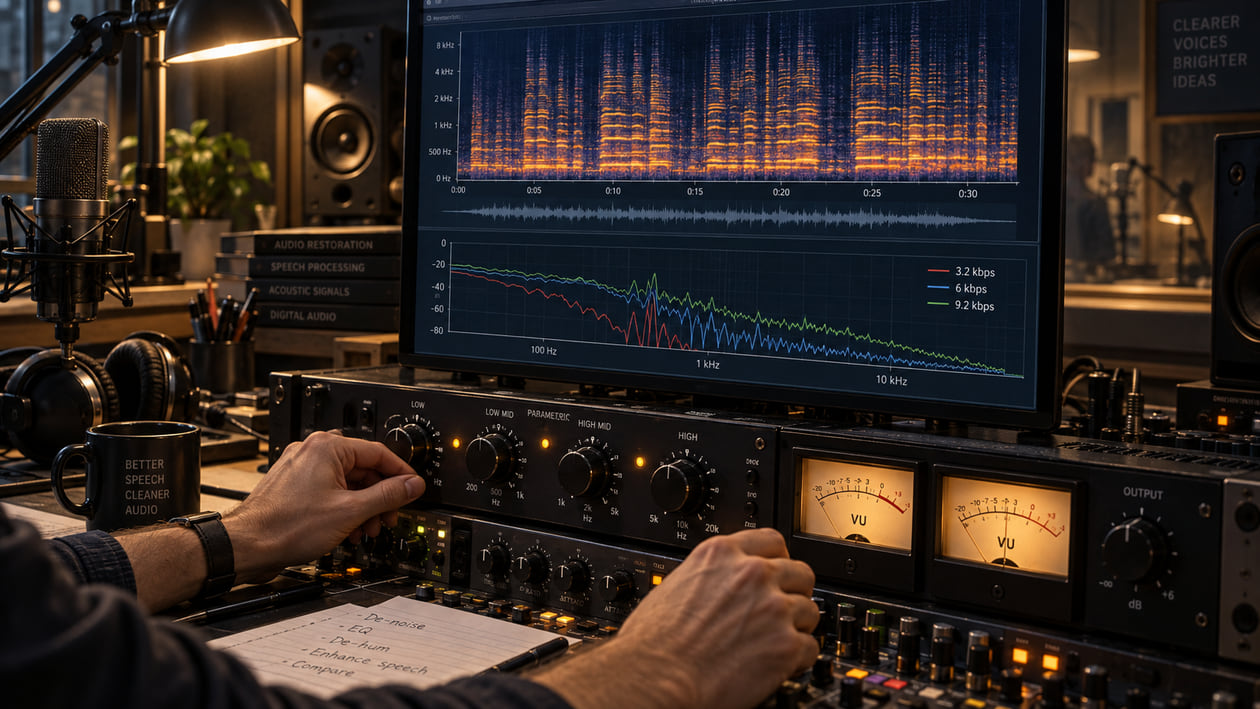
A voice can remain understandable after aggressive compression and still become tiring to hear. Sustained vowels may acquire a metallic ring, consonants can feel brittle, and room tone can turn into a synthetic texture that follows every word. Those are useful descriptions of the decoded sound. They are not proof that one particular neural layer or frequency caused the problem.
The practical response is to preserve the earliest decoded file, isolate the shortest phrase where the defect is obvious, and compare every change at the same perceived loudness. Treat the audible symptom, not a theory about a model. Lyra is designed to keep speech useful on constrained networks; cleanup begins only after that transmission job is finished.
Checked September 20, 2026. Google’s official repository describes Lyra as a generative low-bitrate speech codec, not a music generator. Lyra V2 is based on SoundStream and supports 3.2, 6, and 9.2 kbps. The official command-line examples use WAV speech as input, create a .lyra bitstream, and decode it again. The project does not document MP3, FLAC, or stem exports.
The short answer: treat the decoded speech, not the codec label
Start with the audio you can hear. If one held vowel rings while the rest of the sentence sounds natural, a narrow dynamic reduction may help. If every word feels thin, noisy, and unstable, broad EQ will not rebuild the missing source. If packet loss or a broken edit removed syllables, restoration cannot write the performance back into the file.
I usually begin with one phrase that contains a sustained vowel, a sharp consonant, and a short pause. That loop reveals tonal resonance, brittle edges, and synthetic room tone without forcing me to process the whole recording. I then return to the full sentence before accepting a change, because a setting that beautifies a soloed vowel can reduce intelligibility in context.
Keep the correction modest. Speech needs recognizable consonants and stable vowel shape more than it needs a perfectly smooth spectrogram. The aim is a voice that attracts less attention to the codec while remaining unmistakably the same speaker.
What Lyra V2 actually is
Lyra compresses speech for communication over limited bandwidth. Google’s repository says the codec extracts features from speech in 20 ms frames, transmits a compact representation, and uses a generative decoder to recreate the waveform. Lyra V2 uses SoundStream, an end-to-end neural audio codec with residual vector quantization, usually shortened to RVQ.
RVQ represents the signal with several discrete quantizer stages. In practical terms, more stages can carry more information, while fewer save bandwidth. Google’s Lyra V2 release documents three bitrates: 3.2, 6, and 9.2 kbps. It also reports lower latency and faster operation than V1. Those are codec facts, not promises that every recording will be artifact-free.
The release calls the software beta and says its API and bitstream may change. The source code is available under Apache 2.0. That license covers use of the code under its terms; it does not grant rights to somebody else’s recorded voice, script, music, or performance.
Lyra is sometimes discussed beside broader neural audio systems because SoundStream can model audio. The released Lyra project, however, is framed around speech communication. There is no official Lyra song generator, five-stem export, mastering mode, or consumer download catalog to describe here.
How neural codec damage differs from MP3 artifacts
MP3 and Lyra solve compression with different tools, so their failures need not sound identical. A low-bitrate MP3 may produce watery high-frequency movement, pre-echo before a transient, or swishing around cymbals. Lyra V2 reconstructs speech from a compact neural representation. A constrained result may instead feel tonal, buzzy, robotic, or unstable around voice formants.
A formant is a group of resonances that helps you recognize a vowel and the character of a voice. If that shape wobbles, a steady “ah” can seem to move even when the speaker held the pitch. If short harmonics lock into a repeated pattern, the voice may gain a metallic edge. These descriptions tell you what to hear; they do not prove a “neural vocoder phase error” inside the processing chain.
Do not assume Lyra imposes a universal cutoff at 8 kHz. The official Lyra V2 material documents bitrates and listening comparisons, not a fixed spectral ceiling for every file. Source bandwidth, encoder settings, resampling, transmission errors, later exports, and additional lossy encoding can all change what reaches you.
The metallic-sound guide helps distinguish stable hiss, moving shimmer, and ordinary brightness. The generator is different, but the listening discipline transfers: name the sound before reaching for a processor.
Source preflight: preserve the earliest decoded WAV
Preserve the earliest decoded WAV or other uncompressed PCM file you can lawfully access. Do not convert a damaged MP3 to WAV and call it a recovered master. That conversion only wraps the already damaged samples in a different container.
The official Lyra CLI example reads WAV speech, encodes a .lyra representation, and decodes it. It does not describe MP3 or FLAC as native Lyra exports, and it does not describe stems. If you received a podcast, voice note, or voiceover as MP3, ask whether an earlier decoded WAV exists before processing the lossy delivery copy.
Confirm the bitrate when metadata or the encoder log is available. Do not infer 3.2 kbps from sound alone. A 9.2 kbps stream followed by poor resampling or another lossy encode can sound worse than a carefully handled 3.2 kbps example. Record the sample rate, channel count, known Lyra bitrate, and later conversions. That chain-of-custody note prevents you from blaming the wrong stage.
Listen before looking. Mark the exact phrase that bothers you, then inspect it with the audio-to-spectrogram guide. A spectrogram can show repeated horizontal energy, gaps, noise bursts, or abrupt bandwidth changes. It cannot reveal the model’s hidden cause, and a visually smooth plot does not prove natural speech.
Lyra V2 listening and spectrum map
Lyra V2 Listening and Spectrum Map
| Symptom | What you may see | Verify first | Restrained first action |
|---|---|---|---|
| Stable metallic ring on vowels | Narrow horizontal energy following voiced speech | Does the same pitch remain after loudness matching? | Use a narrow dynamic band only when the ring appears |
| Brittle “s,” “t,” or “sh” | Short upper-frequency bursts | Is the consonant louder, or is the whole comparison louder? | Try gentle phrase-triggered de-essing |
| Thin or hollow voice | Weak lower harmonics or changed balance | Compare the earliest source and check later filtering | Add subtle body without inventing an octave of bass |
| Fluttering vowel shape | Harmonic ridges moving irregularly | Check the speaker, resampling, and edits | Test light track-aware cleanup; avoid hard pitch correction |
| Synthetic noise in pauses | Texture rising between words | Check gates, packet concealment, and later compression | Try slow low-range expansion or automation |
| Missing or repeated speech | A gap, duplicate block, or abrupt boundary | Confirm packet loss or editing damage | Return to the source; cleanup cannot rebuild words |
This is a diagnosis map, not a fingerprint database. Inspect a short spoken phrase in a spectrogram, but decide with your ears and the complete sentence. Repetitive stripes can suggest a tonal problem, yet speech naturally contains harmonics. Remove only energy that sounds wrong.
Restrained manual cleanup in your DAW
Begin with gain and editing. Remove accidental duplicate regions, reconnect clean room tone where an edit left a hard gap, and use a short crossfade for a click at a splice. These steps fix timeline problems without changing the voice itself.
For a stable metallic ring, load a dynamic EQ and sweep a narrow band while the phrase loops. Once the ring becomes obvious, return the boost to zero and apply a small reduction only when that band crosses the threshold. Make one narrow, dynamic correction at a time. If the voice loses vowel clarity or becomes phasey, reduce the range or stop.
For brittle consonants, use a de-esser that responds only to the sharp syllables. There is no universal Lyra de-essing frequency. Find the region in that speaker’s decoded file. The AI vocal de-robotizer explains why plastic vowel texture, hard consonants, and moving high-frequency grit need different treatment.
Subtle saturation can give a thin voice a more continuous lower-midrange impression, but it cannot recover the original harmonics. Add it while listening to complete sentences. Heavy saturation can turn codec buzz into denser distortion.
Avoid stacking a denoiser, exciter, de-esser, multiband compressor, and limiter because each sounds useful alone. Every stage can make the next react to a new artifact. Bypass the entire chain at matched loudness after each meaningful move.
The Sunofix path for Lyra-decoded speech
Manual processing works when the problem stays in one narrow band. A moving metallic layer can be harder: it follows pitch, consonants, and pauses, so a static notch either misses it or cuts too much voice.
I built Sunofix for audio that already has a performance worth keeping but still carries a synthetic edge. Upload the earliest lawful decoded file the service accepts, not the .lyra transport bitstream. Test the shortest useful section first, then compare raw and processed files at matched perceived loudness.
Run a level-matched Sunofix comparison on the sustained vowel, sharp consonant, and pause marked during diagnosis. The useful result is simple: metallic or robotic texture is less distracting, words remain easy to understand, and the speaker still sounds like the same person.
Sunofix can reduce audible synthetic texture in the file you provide. It does not decode Lyra packets, repair networking, rebuild missing syllables, or authenticate a speaker. It also does not turn a low-bitrate communication recording into a studio master.
Hard limits of low-bitrate restoration
Cleanup cannot reconstruct the original waveform or true high-frequency detail that the codec or a later conversion did not preserve. An exciter may create harmonics, but those are generated additions, not recovered evidence. A spectrogram that looks fuller after processing does not mean the original information came back.
A missing word needs another source, a new recording, or an editorial decision. Packet-loss concealment that repeated a sound may need a manual edit. Severe clipping needs an unclipped source when one exists. If pronunciation or performance is the problem, codec cleanup is the wrong tool.
Keep legal boundaries clear. Apache 2.0 permits use of Lyra source code under that license, but audio rights remain separate. Sunofix does not grant rights to the underlying recording or guarantee distributor approval. Obtain permission for the voice and content, follow applicable privacy rules, and retain the original for audit or rework.
Stop when the sentence is comfortable and intelligible. Over-processing can erase identity cues, soften consonants, or create a new synthetic sheen. The smallest useful change is safer than chasing a flat spectrum.
Lyra audio cleanup checklist
- Preserve the earliest decoded WAV and keep an untouched copy.
- Confirm the bitrate when metadata or the encoder log is available; never guess from sound alone.
- Inspect a short spoken phrase in a spectrogram after naming the audible symptom.
- Make one narrow, dynamic correction at a time and bypass it at matched loudness.
- Run a level-matched Sunofix comparison when the texture moves with the voice.
- Check intelligibility on a second playback system, including a small speaker or phone.
- Return to the source for missing words, severe clipping, or broken edits instead of forcing restoration.
If the metallic layer no longer pulls attention away from the message, the consonants remain clear, and the speaker still sounds recognizably human, cleanup has done its job. Preserve that version, document the change, and resist another pass unless a specific remaining problem asks for it.
FAQ
Lyra Audio Codec Artifacts: Clean Metallic Speech Without Inventing Detail FAQ
What causes a metallic sound in Lyra-decoded speech?
Low-bitrate neural reconstruction can produce tonal or buzzy texture, unstable consonants, and speech that feels synthetic. Hearing those symptoms does not prove one internal cause, so diagnose the decoded file before choosing EQ or restoration settings.
Can Sunofix clean podcasts or voiceovers that passed through Lyra?
You can test a lawful decoded audio file in Sunofix when metallic or robotic texture is the main problem. Compare at matched loudness and keep the original, because cleanup cannot recover information that the low-bitrate encoding discarded.
Does cleanup restore frequencies missing from a 3.2 kbps stream?
No. Cleanup can reduce distracting synthetic texture and improve comfort, but it cannot recreate the original waveform or genuine high-frequency detail that is no longer present.
Does Lyra export MP3, FLAC, or music stems?
Google's repository documents a speech-codec bitstream and command-line WAV examples. It does not document a consumer MP3 or FLAC download flow, and it does not provide music stems.